Introduction
Ever tried capturing the perfect product photo and then realized the background completely ruined everything?
That is a common problem experienced by fashion and activewear sellers.
And let's face it, no one wants to waste hours trying to beautify a pair of leggings or a sports bra just to make them listing-ready.
That's where Designkit Free Background Remover comes in. It promises clean cutouts in seconds, but can it handle tricky straps, fabric folds, and fine edges? We put it to the test with fashion and activewear photos to see if it really delivers.
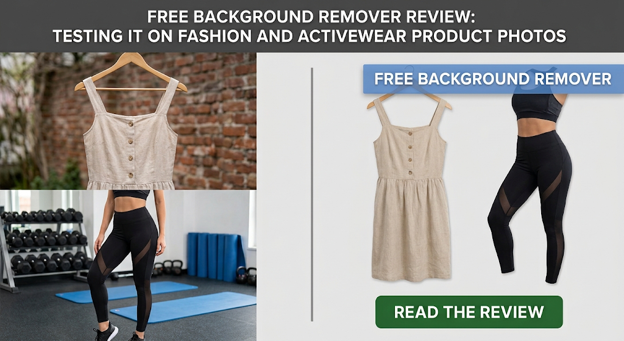
The Pile of Product Photos Waiting to Be Edited
Sneaker boxes on the desk. Activewear, still in shipping bags. And a phone, full of product photos that you need to post by Friday. Does that sound like your life?
The trouble? Half of the photo library has cluttered backgrounds. A sneaker shot on a cluttered floor isn't attractive. Neither is a legging set shot in front of a wrinkled bedsheet. And bothering to manually retouch every photo? That would take forever.
So today wasn't actually a shoot day. It was a clearing-up day. And we put that to good use to see if Designkit's Free Background Remover could manage the actual workload of a fashion shoot.
Why Fashion and Activewear Photos Are a Harder Cutout Problem Than They Look
You may easily separate the background of a bottle of water or a phone by following these steps, but… fashion? No doubt it will be challenging. Fabrics have soft edges, minute holes, and detailed work, which might easily be overlooked by background removal tools.
A few of the areas that may lead to a lot of challenges:
Sneaker laces and eyelets: When laces make small holes, they could leave some parts of the background.
Bag straps and hardware: Metal parts and straps if the bag is so small, may be removed, or the shape of these parts may be distorted.
Mesh and knit fabrics: Fabric holes (like mesh) and soft edges are hard for software to see where the background starts.
Fringe and drawstrings: The software might cut loose threads and hanging strings of the fabric during background removal.
Overlapping garments: Layers of fabric with similar colors might be hard for the tool to distinguish.
Backgrounds with sharp borders are very simple. Background removal algorithms often fail with fabrics. And guess what, that's exactly what we wanted to check with Designkit.
Meet Designkit: The Tool Behind Today's Cleanup
So many product photos still needed to be edited; we needed something fast and simple. That's where Designkit comes in. Designkit is an AI-powered e-commerce visual creative platform that covers everything from product photography and background removal to virtual try-on and marketing assets.
We were most interested in the Free Background Remover for this test. The tool runs right from your browser and requires zero additional installations. Just choose a JPG, PNG, or WEBP file, and the AI takes care of the background removal in a matter of seconds.
It also offers some useful extras besides background removal:
Batch editing: Remove backgrounds from up to 15 photos at once.
100 free exports daily: Sign in to download full-size images.
Background options: Keep it transparent or switch to white or any custom color.
Easy resizing: Prepare images for Shopify, Amazon, Instagram, and other platforms.
Sounds handy for a pile of fashion photos, right? But the real question is whether it can keep those tiny fabric details intact.
The Rack — 5 Pieces We Put Through the Test
Time for real fun! We selected five items of fashion and activewear to experiment with various fabrics and shapes, and tricky edges. Here is how the tests turned out with each item.
Item 1: Laced Shoes
It started with a shoe photograph taken in a cluttered scene. The biggest issue would be those tiny holes in the eyelets.
Result: Designkit eliminated the background mess without altering the shape of the shoe. The edges of the sole seemed quite neat, and the laces also seemed to have their own identity rather than turning into a hazy blob.
Item 2: Leggings Laid Flat
Here, we tested a pair of leggings laid flat against a busy background. Compared to sneakers, leggings have very soft fabric edges that may be hard to cut out due to their softness and irregularity.
Then, you can further edit the picture in Designkit and remove the extra things manually.
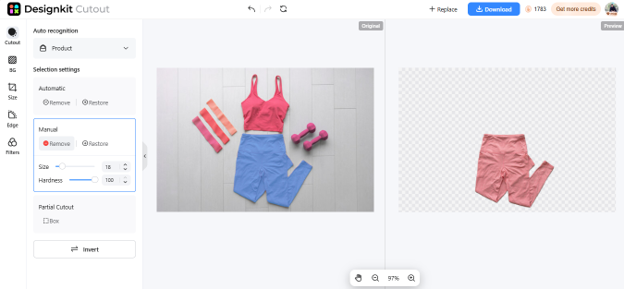
Result: Designkit got rid of the background pretty well without leaving the leggings stiff or unrealistic. The fabric curves remained smooth and the edges sharp.
Item 3: Gym Bag with Straps and Hardware
On this round, the subject of our test was a gym bag featuring long straps, a couple of buckles and a zipper.
Result: The result of the background removal on Designkit was surprisingly good. It kept the straps separate from the background as well as highlighting the metal accessories. What's more, the space between the straps and the bag's body looked quite realistic.
Item 4: Mesh Performance Top
Without a doubt, this was the most difficult clothing item at Designkit testing. Mesh fabric is a type of fabric that is thin and has a lot of holes or semi-transparent parts.
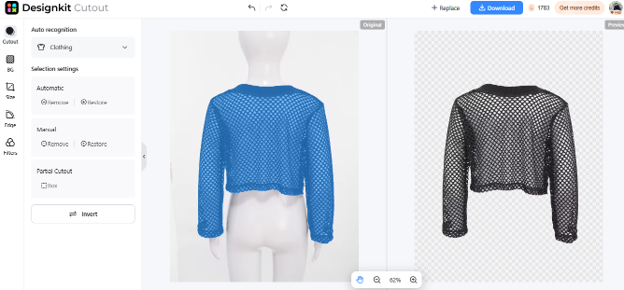
Result: A good portion of the background was removed with Designkit, while the overall pattern of the mesh is still in view.
Item 5: Jacket Over a Base Layer
In the end, we checked a complex outfit of layers; jacket on top of a close-fit t-shirt.
Result: Designkit has deleted the background very cleanly while both shirts were preserved. Clear outlines; the overlapping of the layers has become natural.
Where It's Worth a Second Look
Designkit did a great job on all five fashion and activewear images. Everything from shoelaces and narrow bag straps, mesh fabrics, to layers of overlapping clothes felt crisp and natural, and even more complex fabric edges held up well, with no background residue.
We didn't notice any glaring problems in our test, but we do recommend zooming in before uploading high-end campaign shots, particularly where every single pixel counts. For simple product pages and social media posts, Designkit produced great results with no editing at all.
The Verdict: Is Designkit Rack-Ready?
So, did we clear that pile of product photos? Yes, and without spending hours editing!
The sneakers and gym bag came out clean enough for publishing as shown. The leggings and layers also looked perfect.
If you're a fashion brand, activewear seller, stylist, or content creator struggling to get through dozens of product images, Designkit's Free Background Remover will free you from time-consuming background clean up so you can get back to uploading products.